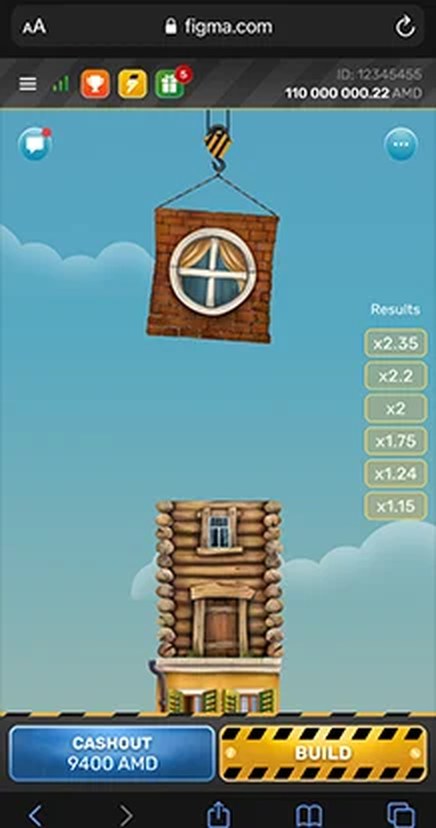
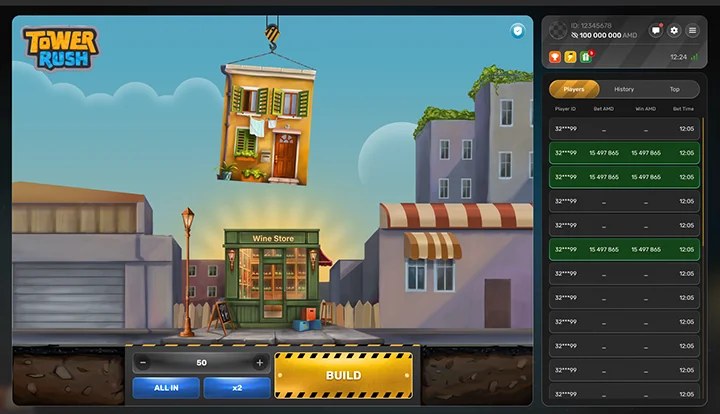
The Tower Rush demo runs the Galaxsys floor-building game on virtual credits, so the controls can be learned and the build-and-collect loop practised without risking money. The official Galaxsys product page provides mobile and desktop demo routes, and whether the demo opens depends on age, location and browser rather than on any payment.
18+ only | Virtual demo credits | No withdrawable winnings | Play responsibly
Contents
Tower Rush Demo at a Glance
The table sets out what to expect from a genuine demo. Check each detail against the in-game information panel, because configurations and available features can differ between versions and platforms.
| Demo detail | What to expect |
|---|---|
| Developer | Galaxsys |
| Release | 28 February 2024 |
| Category | Fast Game and Turbo Game |
| RTP | 96.2% to 97.6% |
| Demo devices | Mobile and desktop |
| Practice currency | Virtual credits |
| Deposit required | Not for genuine practice |
| Withdrawals | Not available |
| Bonus floors | Frozen, Temple and Triple Build |
| Fairness | RNG and provable fairness |
| Financial risk | None with virtual credits |
What Is Tower Rush Demo Mode?
Demo mode is a practice version of the game that runs on virtual credits instead of money. The screen, the Build and Collect controls, the cumulative odds and the bonus floors behave as they do in the full game, but nothing won or lost carries any cash value. That makes the demo the natural place to learn how a round works, because a mistake costs nothing.
Because the credits are virtual, the demo also removes the pressure that comes with money at stake. Each build-and-collect decision can be taken slowly, a round can be repeated as often as wanted and the way the cumulative odds respond can be studied, all without financial consequences. No result is controlled by us, and the game itself is a Galaxsys product.
Tower Rush: Is the Demo Identical to Every Real-Money Version?
Not always. The demo is designed to mirror the game, but the published RTP is a range of 96.2% to 97.6% rather than a single value, and a range means the title can be configured differently across versions and platforms. The controls and the bonus floors are usually the same, yet the exact RTP, stake range and settings can vary.
The practical takeaway is that the information panel is the source of truth for whichever version is in play. The RTP and the rules are best read there rather than assumed, and a figure should not be carried from one platform across to a different one.
Why Use the Tower Rush Demo First?
Starting in the demo gives every advantage of learning the game with none of the financial risk. These are the specific things the free version is good for.
Learn the Controls Without Financial Pressure
The demo lets the Build, Collect and stake controls be found and watched before any money is involved. Learning the interface calmly, without the pressure of a real balance, means the first decisions are informed rather than rushed.
Understand the Build-and-Collect Decision
The core of Tower Rush is the repeated choice to build another floor or collect the value already on the tower. Practising that decision on virtual credits makes the trade-off between securing a value and risking it for a taller tower easy to feel, which is the heart of the game.
See How Cumulative Odds Work
Because floor factors multiply rather than add, the cumulative odds climb faster than simple addition would suggest. On a 100-credit stake, factors of 1.20, 1.25 and 1.40 multiply to 2.10, which shows as 210 credits, while a run of 1.20, 1.50 and 1.40 multiplies to 2.52 and shows as 252. The demo lets this build-up be watched in real time.
Examine the Bonus-Floor Information
The demo is a safe place to see how the Frozen, Temple and Triple Build bonus floors appear and to read what the information panel says about each one. Because they are random, they cannot be forced, but they can be learned and recognised without money at stake.
Check Mobile Performance
Opening the demo on a phone shows how the game performs on that device and connection before it is relied on. A stable connection makes the game feel smoother, but it does not change the odds or make any floor more likely to succeed.
Recognise the Genuine Galaxsys Version
Practising with the official demo helps in learning what the real game looks like, so a cloned site or a modified app is easier to spot later. Confirmation that Galaxsys is named as the provider and that the panel shows the expected RTP range matters here.
How to Access Tower Rush Demo Online
These steps run from finding the game to reviewing the first result. They are best followed in order, without skipping the safety checks near the start.
- 1Open the official product page. Start from the Galaxsys product page and verify the provider domain, galaxsys.co, rather than trusting an advert or a forwarded link.
- 2Complete the age check. Confirmation that the age stated is 18 or older when prompted is required, because the game is intended for adults only.
- 3Choose mobile or desktop demo. The route that matches the device is selected; both open in a browser without a separate download.
- 4Verify that the balance is virtual. A check that the credits are practice money with no cash value comes before the first floor is built.
- 5Open the rules. The information panel is read for the RTP, the stake range and the listed features of the version in use.
- 6Choose a small virtual stake. Keep the amount low and fixed so the cumulative calculation stays easy to follow.
- 7Press Build. Start the round and wait for the floor result; the animation is decoration, not a timing test.
- 8Collect or continue. Secure the current value or attempt another floor while accepting the risk of a collapse.
- 9Review the result. The round history shows what happened before the next practice round begins.
Tower Rush Demo Controls
The demo uses the same controls and displays as the full game. The table names each one and describes what it does.
| Control or display | Purpose |
|---|---|
| Virtual balance | Practice credits with no cash value |
| Stake selector | Virtual credits placed per round |
| Build | Attempts the next floor |
| Collect or Cash Out | Ends the round at the current odds |
| Cumulative odds | Combined value of the successful floors |
| Potential return | Estimated virtual return if the round is collected now |
| Information panel | Rules and RTP for the version |
| Round history | Earlier results for review |
Tower Rush Demo Versus Financial Play
The demo and a real-money environment look similar but are not the same experience. The table shows the practical differences.
| Feature | Demo mode | Financial play |
|---|---|---|
| Value used | Virtual credits | Money |
| Deposit | Not required | Operator account |
| Withdrawable result | No | Subject to law |
| Financial loss | None | Real |
| Emotional pressure | Lower | Higher |
| Registration | May not be required | Operator-controlled |
There is a legal dimension in India as well. The Promotion and Regulation of Online Gaming Act, 2025 prohibits online money games, their advertising and related fund transfers, and its relevant provisions commenced on 1 May 2026. The free demo is practice content on virtual credits, which is why this guide focuses on it rather than any real-money route.
Tower Rush: How to Use Demo Mode Productively
A short, structured plan makes the demo far more useful than random tapping. Five focused sessions, each with a single goal, work well.
Session 1: Learn the Screen
The demo is opened and each control and display identified. The Build and Collect buttons, the stake selector, the cumulative odds and the round history come before any concern about outcomes.
Session 2: Follow the Calculation
A small fixed stake is kept, and each successful floor can be watched multiplying the cumulative odds. The aim is to see the multiplication happen rather than to reach any particular value.
Session 3: Compare Decisions
Collecting early on some rounds and continuing on others shows how each choice feels. This session is about the trade-off between securing a value and risking it for a taller tower.
Session 4: Inspect the Bonus Information
When a Frozen, Temple or Triple Build floor appears, the information panel is worth reading. Each one is recognised rather than forced.
Session 5: Find the Round Record
Practising the location and reading of the round history confirms what happened in any round. This habit is also how an outcome is checked after a dropped connection.
Tower Rush: What Demo Mode Can and Cannot Teach
The demo is ideal for learning the controls, seeing how the cumulative odds build and confirming which bonus floors and settings a version includes. The build-and-collect loop can be practised with no financial pressure and rounds repeated until the mechanics are clear.
What the demo cannot teach is a winning system, because there is not one to learn. It cannot predict future results, a good run on virtual credits does not carry over into any advantage with real money, and the house edge remains the same however well a practice session goes. The demo is for understanding the game, not for hunting a pattern that does not exist.
Tower Rush Demo Safety Checklist
A genuine demo has a recognisable shape. This checklist is worth working through before any site that claims to offer Tower Rush practice is trusted, and the first warning sign is the place to stop.
| Safety check | Acceptable sign | Warning sign |
|---|---|---|
| Domain | Official Galaxsys or clearly identified operator | Misspelled or shortened link |
| Payment request | No payment for practice | UPI or crypto to unlock |
| Download | Browser access | Unsolicited APK |
| Provider identity | Galaxsys shown | No provider named |
| Permissions | Normal browser | Contacts, SMS or screen access |
| Predictions | No guaranteed claims | Predictor or secret server access |
| Account information | No password required | Login or remote access |
A genuine Tower Rush demo never asks for a deposit, a UPI PIN, an OTP or an installed APK, and no predictor or secret server can reveal the next floor, bonus or collapse. Any site that demands payment to unlock practice credits, requests remote access to a device, or promises guaranteed results is a fraud attempt. Report it to cybercrime.gov.in or call 1930.
Tower Rush Mobile Demo Guide
On a phone the demo runs in the mobile browser, so there is nothing to install. The Build and Collect controls sit near the tower for easy thumb reach, and the layout compresses the history and settings to fit the smaller screen. The demo is opened, the age check completed, the balance confirmed as virtual and the stake kept small while learning.
A stable mobile connection makes the animation feel smoother, but it does not change the odds or make a floor more likely to succeed. If the connection drops mid-round, the Build control should not be tapped repeatedly; the connection is restored and the round history checked, since the server settles the round regardless of what the screen showed.
Tower Rush Desktop Demo Guide
On a laptop or desktop the demo opens in a standard browser tab with more room for the history panel and settings alongside the tower. The controls work the same way with a mouse or trackpad, and the larger screen makes it easier to read the cumulative odds and the information panel side by side.
As on mobile, confirmation that Galaxsys is named as the provider and that the balance is virtual comes before the first build. The extra screen space is a comfort, not an advantage: the results are still random, and no window size, browser or connection speed changes the house edge.
Tower Rush: Responsible Use of Free Play
Even free play deserves boundaries, because the demo is designed to feel like the real game. A time limit is set before the start, the session is treated as practice rather than a hunt for a winning pattern, and a strong run on virtual credits proves nothing about real-money outcomes.
A fuller walkthrough of the mechanics is available in our how to play guide before practice begins, and our responsible gambling guidance covers what to do if play ever stops feeling like fun. This guide was last reviewed on 16 July 2026.
Tower Rush Demo FAQ
Is registration needed for the official demo?
Usually not. The official Galaxsys demo is designed to run on virtual credits without an account, so genuine practice normally needs no registration. If a site insists on a deposit or full sign-up before practice is allowed, that is a reason for caution rather than a requirement of the demo.
Is a deposit required to play the demo?
No. A genuine demo runs on virtual credits and never asks for money, a UPI PIN or card details before practice begins. Any page that demands a payment to unlock practice credits is a warning sign, not a normal step.
How many virtual credits does the demo start with?
The starting virtual balance is host-dependent, so there is no universal figure. Claims of a fixed amount such as 10,000 credits are not a rule of the game; the number simply depends on the platform the demo is opened on. Because the credits have no cash value, the exact figure does not matter for learning.
Can demo winnings be withdrawn?
No. Demo results are virtual and have no cash value, so nothing from the demo can be withdrawn. A large virtual result is a learning outcome, not money, and any site that offers to convert demo credits into a payout is misleading.
Does the demo include bonus floors?
In most versions the demo mirrors the real game, including the Frozen, Temple and Triple Build bonus floors, so it is a good place to see how they appear. The exact behaviour can differ between versions, so the information panel for the version in play is the place to check.
Does the demo use the same RTP as real-money play?
The demo generally reflects the provider configuration, but confirmation in the information panel is better than an assumption. Galaxsys publishes an RTP range of 96.2% to 97.6%, and the figure shown in the panel for that version is the one that applies.
Is an APK needed for the demo?
Yes. The official demo runs in a mobile or desktop browser, so no APK or separate application is needed. Avoid any file that claims to offer unlimited credits, a predictor or an unlocked version, because a browser demo never requires a download.
18+ only. Tower Rush is a game of chance. India: Tele-MANAS 14416 or 1800-89-14416; emergency 112. Never chase losses.
Tower Rush Game Screens
Real Tower Rush captures, so every visual below shows the actual Galaxsys product rather than a redrawn mock-up.